
Hey Unity Community! The first part of my general purpose toolset, SparkTools, is getting close to release. It’s a custom build tool which allows you to easily manage multiple builds, including automated folder and file organization, which is all fully customizable.
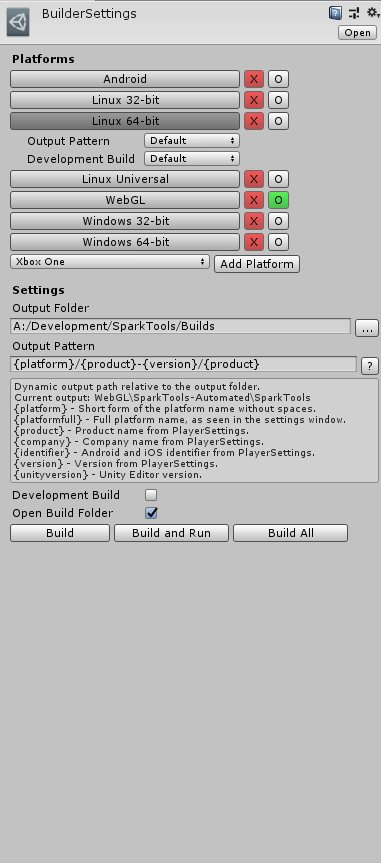
Simply select the platforms you wish to build for, and add them to your list. Choose an output folder where all your builds will be stored, as well as an output pattern, which is a user created path based on mixture of static text and dynamic symbols. For instance, if you gave it a pattern of “{platform}/{product}-{version}/{product}” it would build at the path “Win32/MyGame-v1.2.3/MyGame.exe”. All accepted symbols are listed in a togglable help box below the output pattern field.
The currently targeted platform has its circle button highlighted in green. Pressing “Build” or “Build and Run” will build this platform. Clicking the circle button next to a platform will switch to that target. Pressing “Build All” will build every platform from top to bottom, and open the output folder if you have the option selected.
Each platform can be clicked on to expand its individual options menu which override the defaults. This allows you to modify the output pattern for individual platforms, as well as set whether or not they are development builds.
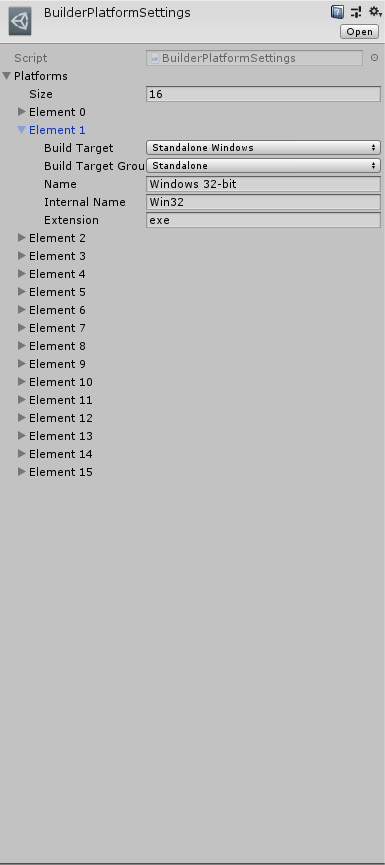
You can add or remove platforms supported by the builder. This means you don’t have to wait for me to update the builder when Unity releases a new platform, you can very easily add support for it yourself! By default it supports every platform Unity currently supports, and each of these settings menus can be reset to their default options by pressing the gear icon and clicking “Reset”.
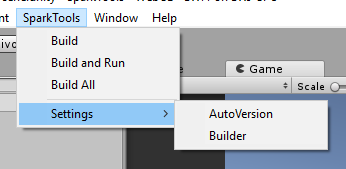
Once you get your settings how you like them, you can completely ignore the settings window and just use the SparkTools dropdown menu. It has all of the build commands in it, as well as a quick link to the settings menu. This menu will be used for all tools in SparkTools, and you can already see my next tool’s settings in that screenshot, ‘SparkTools: AutoVersion’.
AutoVersion will automatically set the player version of your game to a version number pulled from the git repo your project is in. The builder integrates with this next tool by obtaining that version number before the build process, in order to use it in the output pattern. That being said, AutoVersion is not a dependency.
Lastly, SparkTools: Builder will include full source code, an API, documentation, and (hopefully) Windows, Mac, and Linux Editor support. The price point I’m currently looking at is around 5 USD.
So, what else are you looking for in a custom build tool? What kind of improvements would you like to see? Does the interface look intuitive? How important are advanced build options to you? What other general feedback do you have?
Thank you for your time.